MCP Explained: What Model Context Protocol Means for Your Automations
MCP (Model Context Protocol) is an open standard that lets AI assistants like Claude, ChatGPT, and Gemini connect to external tools and data sources through a single, universal protocol. Instead of building custom integrations for every AI-tool combination, MCP gives every AI the same way to talk to every app.
If you’ve been following the automation space, you’ve probably noticed MCP showing up everywhere — in product announcements, YouTube tutorials, Reddit threads, and conference talks. That’s because it solves one of the biggest headaches in AI automation: getting AI models to actually do things in the real world, reliably and securely. Anthropic introduced MCP in November 2024, and within months OpenAI, Google, and Microsoft had adopted it. It’s now the fastest-growing standard in the AI tooling ecosystem.
What Is MCP?
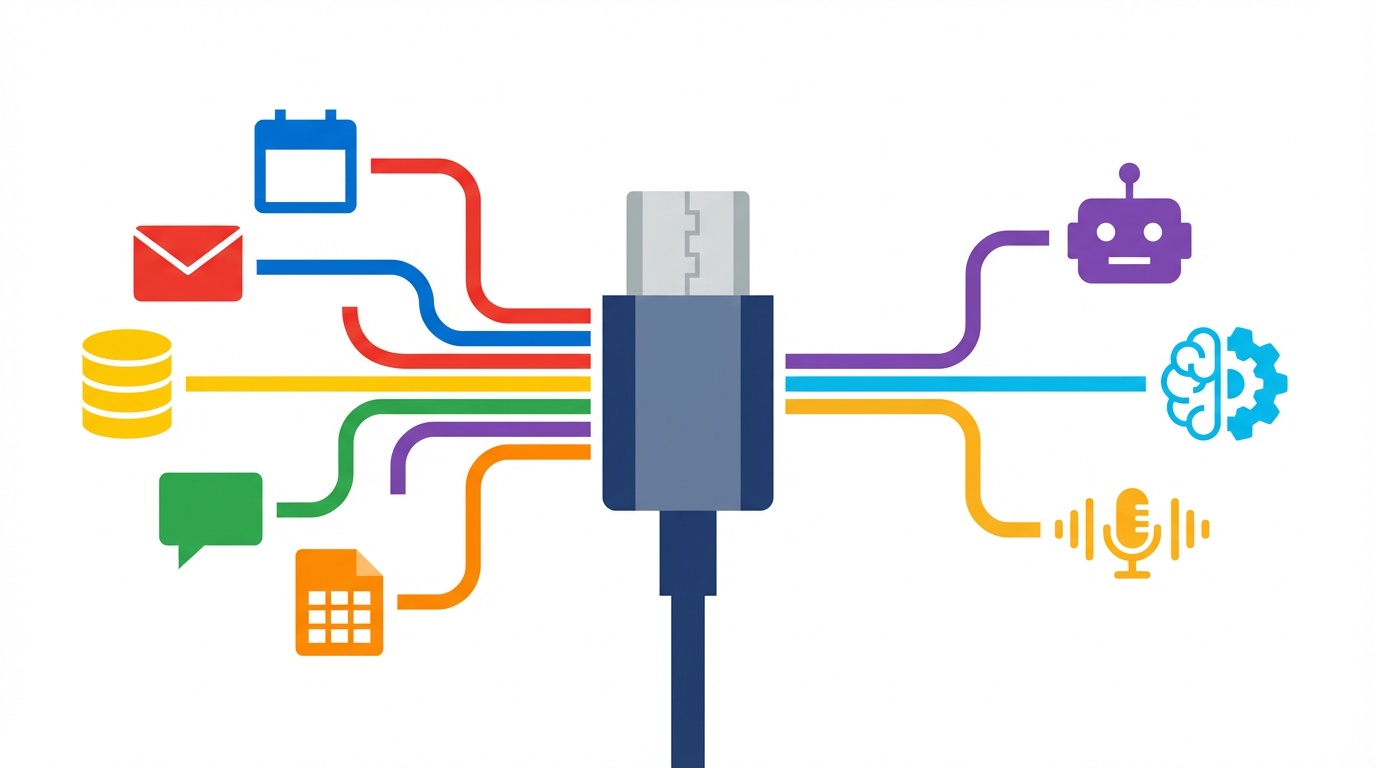
Think of MCP like USB-C for AI.
Before USB-C, every phone manufacturer had their own charging port. You needed a drawer full of different cables just to charge your devices. USB-C fixed that by creating one universal standard — one cable works with everything.
MCP does the same thing for AI-to-tool connections. Before MCP, if you wanted Claude to access your Google Calendar, someone had to build a specific Claude-to-Google Calendar integration. Want ChatGPT to access Google Calendar too? That’s a separate integration. Want either AI to access Slack? Two more integrations. Every new combination meant new custom code.
Key characteristics:
- Open standard created by Anthropic, now adopted industry-wide
- Works with any AI model that supports it (Claude, ChatGPT, Gemini, and more)
- Connects AI to tools, databases, APIs, and file systems
- Built-in permission controls so you decide exactly what the AI can access
- Open-source with a growing ecosystem of pre-built connectors
Simple Definition: MCP is a universal protocol that lets any AI assistant connect to any external tool or data source — like USB-C, but for AI integrations.
Why MCP Matters Now
Three things have converged to make MCP the most important infrastructure development in AI automation right now.
1. The N×M Integration Problem Is Solved
Before MCP, connecting AI tools to apps was an N×M problem. If you had 5 AI models and 100 tools, you theoretically needed 500 custom integrations. Every new AI model or tool added to the matrix exponentially.
MCP turns this into an N+M problem. Each AI model implements MCP once. Each tool builds an MCP server once. Now 5 AI models + 100 tools = 105 implementations instead of 500. That’s not an incremental improvement — it’s a fundamental restructuring of how the AI ecosystem works.
2. Every Major Platform Has Adopted It
This isn’t one company’s proprietary protocol. The adoption curve has been remarkable:
| Milestone | What It Means |
|---|---|
| Anthropic launches MCP (Nov 2024) | Open-source standard created |
| OpenAI adds MCP support (Mar 2025) | ChatGPT ecosystem joins |
| Google, Microsoft adopt MCP | Industry consensus reached |
| Zapier, n8n, Make add MCP features | No-code platforms on board |
| Thousands of community MCP servers | Ecosystem is self-sustaining |
3. Security and Control Are Built In
Unlike prompt-based tool access (where you just tell the AI to “use this API key”), MCP has a proper permission model. Tools declare their capabilities. Users grant specific permissions. AI models can only do what they’re explicitly allowed to do.
This matters for business use cases. When Zapier launched their MCP integration, they highlighted “hard restrictions” — action-level permission controls that aren’t just suggestions to the AI, but enforced boundaries. Your AI assistant can read your calendar but not delete events, or draft emails but not send them, based on permissions you define.
That said, MCP security is still evolving. Proofpoint researchers disclosed the “CursorJack” attack in March 2026, demonstrating how malicious MCP servers could potentially manipulate AI tool calls. The takeaway: stick to trusted MCP servers and review permissions carefully — the same common sense you’d apply to installing any software.
How MCP Works (Without the Jargon)
MCP has three parts. The easiest way to understand them is with a restaurant analogy.
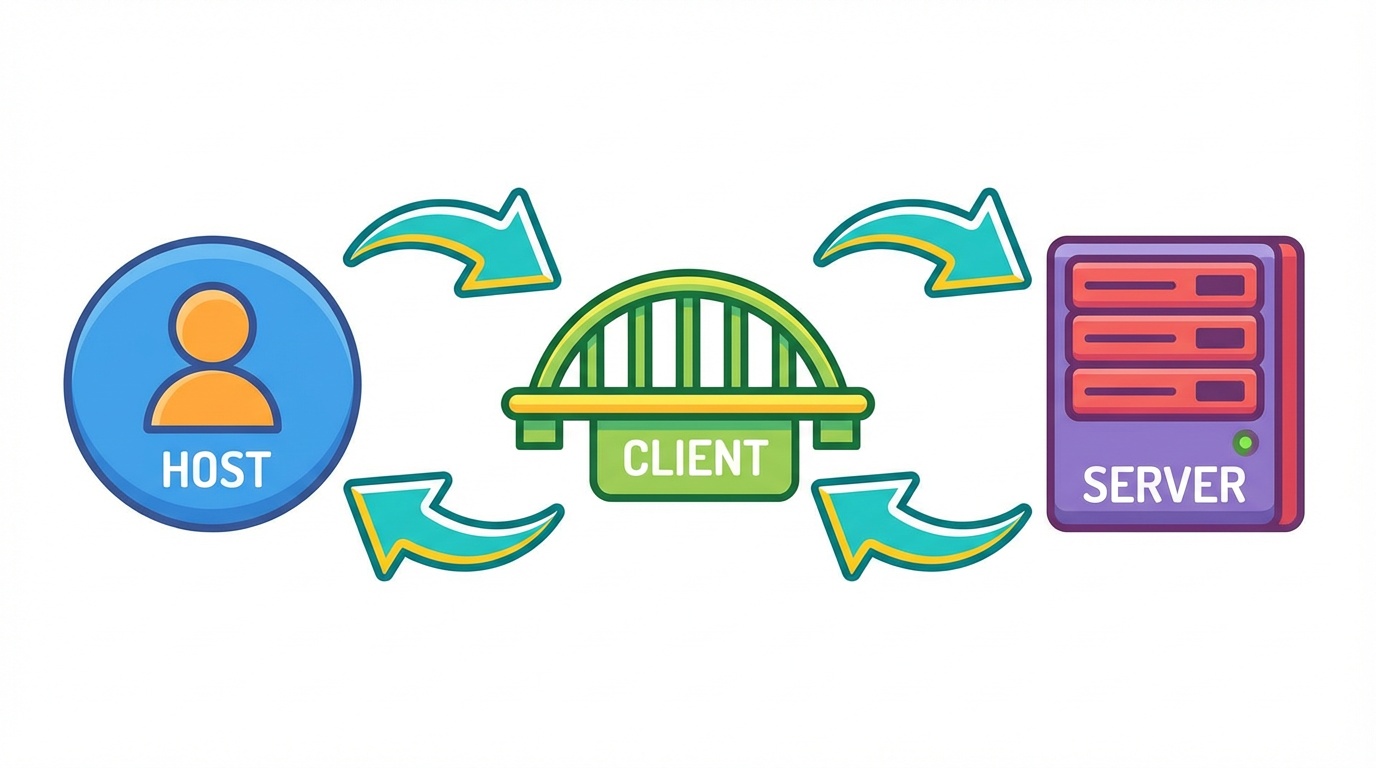
You (the Host) — You’re the customer. You’re the AI application (like Claude Desktop, or ChatGPT) that the user interacts with. You decide what you want to accomplish.
The Waiter (the Client) — The MCP client lives inside your AI application. It translates what you want into a format the kitchen can understand. It maintains the connection, handles the back-and-forth, and makes sure your order gets through correctly.
The Kitchen (the Server) — The MCP server is where the actual work happens. It connects to your tools — Google Calendar, Slack, your database, your CRM — and exposes their capabilities in a standardized way. When the waiter brings your order, the kitchen knows exactly how to prepare it.
Here’s how a request flows:
- You ask Claude: “What meetings do I have tomorrow?”
- The MCP client (waiter) checks which MCP servers (kitchens) are available and finds one connected to Google Calendar
- The client sends a standardized request to the Calendar MCP server
- The server queries your Google Calendar and returns the results
- Claude presents your meetings in a natural, conversational response
The key insight: Claude doesn’t need to know how Google Calendar’s API works. The MCP server handles that. Claude just needs to speak MCP — the universal language.
MCP in Practice: n8n, Make, and Zapier
All three major automation platforms now support MCP, each in their own way. Here’s what that means for you depending on which platform you use.
Zapier MCP
Zapier’s MCP integration (currently in Beta) connects AI assistants like Claude and ChatGPT to Zapier’s ecosystem of 8,000+ app integrations. Instead of building Zaps triggered by webhooks, you can let your AI assistant directly call Zapier actions through MCP.
What you can do:
- Connect Claude or ChatGPT to any of Zapier’s 8,000+ supported apps
- Set granular, action-level permissions (the AI can only do what you explicitly allow)
- Use natural language to trigger multi-step automations
- Each MCP tool call uses 2 Zapier tasks from your plan
Best for: People who want the widest app coverage and the simplest setup. If you’re already on Zapier, MCP extends your existing integrations to work with AI assistants directly.
n8n MCP
n8n offers both MCP Server and MCP Client nodes, giving you the most flexibility. You can consume existing MCP servers or build your own — making n8n both a user and a provider in the MCP ecosystem.
What you can do:
- Use the MCP Client node to connect n8n workflows to any MCP server
- Use the MCP Server node to expose n8n workflows as MCP-compatible tools
- Build custom MCP servers that give AI access to your internal tools and databases
- Self-host everything for complete data control
Best for: Technical users who want full control. If you want to build custom MCP servers for your specific business tools, or self-host for data privacy, n8n is the most powerful option.
Make (formerly Integromat)
Make’s AI Agents feature connects to MCP-compatible tools through its visual canvas. You can see exactly how the AI agent reasons about which tools to use and when.
What you can do:
- Connect AI Agents to MCP-compatible tools within Make scenarios
- Visualize AI agent reasoning on Make’s canvas
- Combine MCP tool access with Make’s existing 2,000+ app integrations
- Use Make’s visual approach to design complex AI agent workflows
Best for: Visual thinkers who want to see how their AI agents work. If you prefer Make’s drag-and-drop interface, MCP integrations feel like a natural extension.
Quick Comparison
| Feature | Zapier MCP | n8n MCP | Make |
|---|---|---|---|
| App integrations | 8,000+ | 1,000+ nodes | 2,000+ |
| MCP role | Server (provides tools to AI) | Server + Client (both) | Client (uses MCP tools) |
| Build custom MCP servers | No | Yes | No |
| Self-hosting | No | Yes | No |
| Permission model | Action-level hard restrictions | Node-level configuration | Agent-level settings |
| Pricing impact | 2 tasks per MCP call | Based on plan/self-hosted | Based on operations |
| Best for | Widest app coverage | Maximum flexibility | Visual workflow design |
5 Practical Things You Can Do with MCP Today
1. Let Claude Manage Your Calendar via Zapier MCP
Connect Claude Desktop to Zapier MCP and give it read/write access to your Google Calendar. Ask it “What’s my schedule like next Tuesday?” or “Block 2 hours for deep work on Thursday afternoon” and it handles it directly — no switching between apps.
Getting started: Enable Zapier MCP (Beta), select Google Calendar actions, connect to Claude Desktop.
2. Build an n8n MCP Server for Your Company Knowledge Base
Use n8n’s MCP Server node to create a custom server that gives AI assistants access to your company wiki, documentation, or internal databases. Your team can then ask Claude or ChatGPT questions about company-specific information and get accurate, sourced answers.
Getting started: Create an n8n workflow with the MCP Server trigger node, connect it to your data source, and point your AI assistant to the server URL.
3. Connect ChatGPT to Your CRM Without Custom API Code
Through MCP, you can give ChatGPT direct access to your CRM (HubSpot, Salesforce, etc.) to look up contacts, update deal stages, or summarize recent interactions — all through natural conversation. No API coding required.
Getting started: Use an MCP server for your CRM (check the growing directory of community-built servers) or set one up through Zapier MCP.
4. Give AI Agents Controlled Access to Slack, Email, and Spreadsheets
MCP’s permission model lets you give AI agents access to everyday work tools while keeping boundaries clear. Let the AI read Slack channels but not post, draft emails but not send, or read spreadsheets but not modify — then gradually expand access as trust builds.
Getting started: Start with read-only permissions on one tool, test for a week, then expand.
5. Chain Multiple MCP Servers for Multi-Tool AI Workflows
The real power of MCP shows up when you connect multiple servers. Your AI assistant can check your calendar (Calendar MCP), draft a meeting prep email using recent CRM notes (CRM MCP), and post a reminder in the team’s Slack channel (Slack MCP) — all from a single natural language request.
Getting started: Connect 2-3 MCP servers to Claude Desktop and start with a workflow you currently do manually across multiple apps.
MCP vs Traditional API Integrations
If you’re already building automations, you might wonder how MCP compares to traditional API integrations. Here’s the practical difference:
| Aspect | Traditional API Integrations | MCP |
|---|---|---|
| Who builds it | Developers write custom code per integration | Tool builders create MCP servers once |
| Who uses it | Anyone (through platforms like Zapier/Make) | AI assistants (Claude, ChatGPT, etc.) |
| Interaction model | Trigger → Action (predefined) | Natural language → AI decides which tools to use |
| Permission model | API keys with broad scope | Granular, action-level permissions |
| Setup effort | Configure per integration | Connect once, access many tools |
| Maintenance | Update each integration separately | MCP servers update independently |
| Best for | Predictable, repeatable workflows | Flexible, AI-driven task completion |
The key difference: Traditional integrations follow predefined paths (if this, then that). MCP lets AI assistants dynamically decide which tools to use based on what you ask. They’re complementary — MCP doesn’t replace your existing automations, it adds a new layer where AI can orchestrate tools intelligently.
Frequently Asked Questions
Do I need to know how to code to use MCP?
No. If you’re using Zapier MCP or connecting to pre-built MCP servers through Claude Desktop or ChatGPT, there’s no coding involved. You configure permissions and connect tools through visual interfaces. Building custom MCP servers (like with n8n) can involve some technical setup, but it’s closer to configuring nodes than writing code from scratch.
Is MCP free to use?
MCP itself is an open-source protocol — free to use and implement. However, the platforms and AI tools you use with MCP have their own pricing. Zapier MCP calls cost 2 tasks per call on your Zapier plan. n8n is free if self-hosted. Claude and ChatGPT require their respective subscriptions for MCP features.
Which AI tools support MCP?
As of early 2026, the major AI assistants supporting MCP include Claude (Anthropic), ChatGPT (OpenAI), Gemini (Google), and several open-source models. On the platform side, Zapier, n8n, and Make all offer MCP support. The ecosystem is growing rapidly — check each tool’s documentation for the latest MCP capabilities.
Is MCP safe? Can AI do things I don't want it to?
MCP includes a permission model where you explicitly define what the AI can and can’t do. Zapier MCP uses “hard restrictions” that enforce limits at the platform level, not just as prompts. That said, MCP is still a developing standard. Researchers have identified potential attack vectors like the “CursorJack” exploit. Best practices: only use trusted MCP servers, review permissions carefully, start with read-only access, and keep your MCP tools updated.
What's the difference between MCP and an API?
An API is a specific interface for one service (e.g., the Google Calendar API). MCP is a protocol that standardizes how AI assistants connect to any tool. Think of it this way: APIs are individual roads between cities. MCP is the highway system — a standard infrastructure that connects everything. MCP servers often use APIs under the hood, but they wrap them in a standard interface that any AI can use.
The Bottom Line
- MCP is the USB-C of AI — one universal protocol that connects any AI assistant to any tool, replacing the mess of custom integrations
- You don’t need to code — Zapier, n8n, and Make all support MCP, and pre-built servers are available for hundreds of popular tools
- Start small, expand with trust — connect one or two tools with read-only access, see how it works, then gradually give your AI more capabilities
MCP is still early, but it’s moving fast. The automation practitioners who understand it now will have a significant head start as AI-driven workflows become the norm. The best part? You don’t need to wait for it to mature — you can start experimenting with MCP today using tools you already have.
Want practical automation strategies like this delivered weekly? Subscribe to the Learn Automation newsletter — one actionable workflow, one tool recommendation, and one quick tip every week.