Human-in-the-Loop AI: How to Automate Without Losing Control
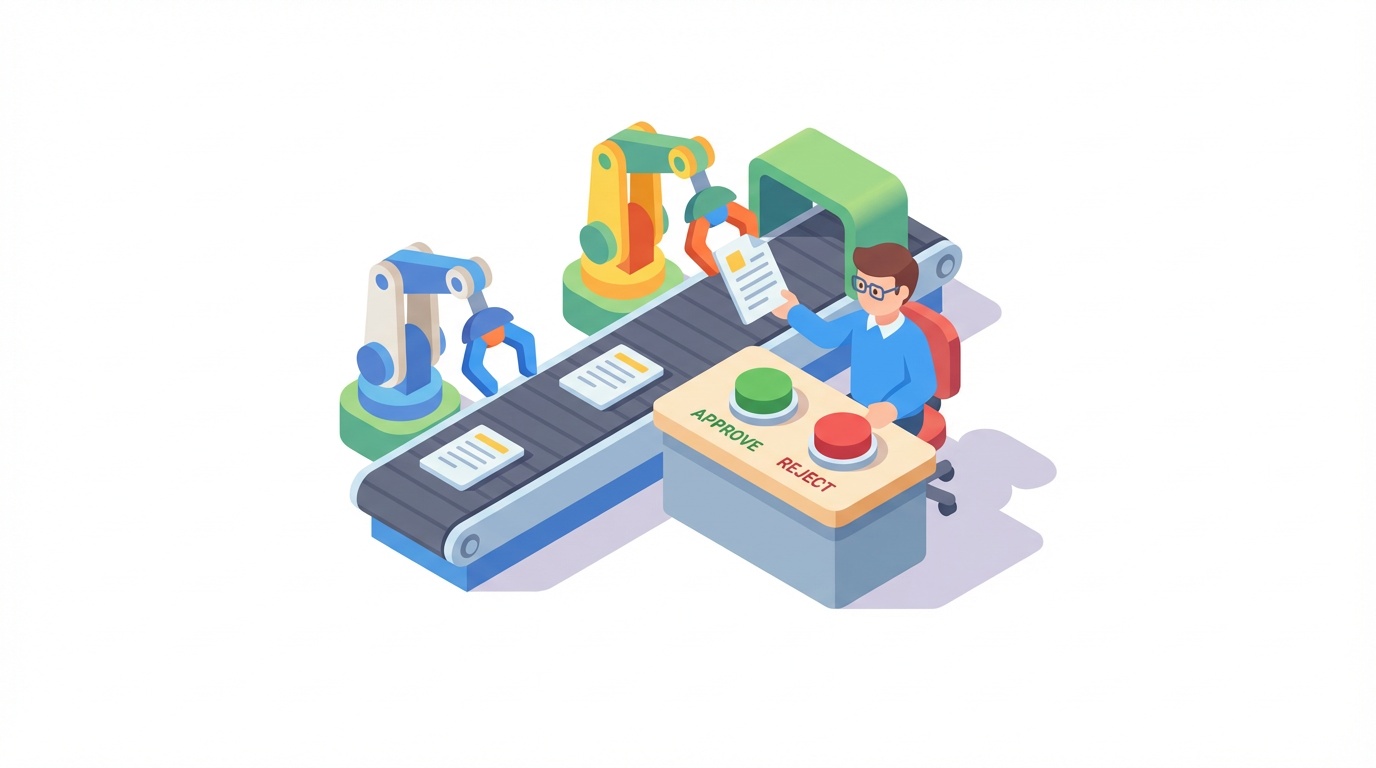
Human-in-the-loop (HITL) is a design pattern where automated workflows pause at critical moments for human review before continuing. Instead of letting AI run unsupervised, you build checkpoints into your automations where a person approves, edits, or rejects what the AI produced — then the workflow resumes.
This isn’t about slowing things down. It’s about keeping the speed of automation while adding judgment where it matters. Gartner predicts that more than 80% of enterprises will have used generative AI APIs or deployed GenAI-enabled applications by 2026 — and the EU AI Act already requires human oversight for high-risk AI applications. The organizations getting this right aren’t choosing between speed and control. They’re designing for both.
What Is Human-in-the-Loop Automation?
Think about how decisions already work in your business.
Your marketing intern doesn’t publish a press release without someone reviewing it. Your finance team doesn’t wire $50,000 based on a single person’s approval. Your sales team doesn’t send contracts without a manager’s sign-off.
Human-in-the-loop automation applies the same logic to AI workflows. The AI does the heavy lifting — drafting, analyzing, classifying, recommending — and a human steps in at the moments where judgment, context, or accountability matter.
Key characteristics:
- AI handles repetitive work (drafting, sorting, summarizing)
- Humans review outputs at defined checkpoints
- The workflow pauses automatically and resumes after approval
- Rejected outputs get flagged, revised, or escalated
Simple Definition: Human-in-the-loop automation is the practice of building pause points into AI workflows where a person reviews and approves the AI’s work before it reaches customers, modifies data, or triggers irreversible actions.
Why Human Oversight Matters Now
AI is moving from “experimental side project” to “core business process” fast. Atlassian’s Teamwork Lab found that the most strategic AI collaborators (what they call “Stage 4”) save 105 minutes daily — equal to an extra workday each week — and their organizations achieve roughly 2x the ROI compared to basic AI users. But that productivity only holds up if the AI doesn’t make expensive mistakes along the way.
1. AI Is Confident Even When It’s Wrong
Hallucinations aren’t a bug that’s getting fixed next quarter. They’re a fundamental characteristic of how language models work. Your AI assistant will draft a customer email promising a feature that doesn’t exist with the same confidence it uses to write a perfectly accurate response. Without a human checkpoint, both go out the door.
2. Regulations Are Catching Up
The EU AI Act requires human oversight for high-risk AI applications. The NIST AI Risk Management Framework warns that unclear HITL roles and opaque decision-making are serious challenges. If you’re in a regulated industry — finance, healthcare, legal — human oversight isn’t optional. It’s compliance.
3. Trust Is Earned, Not Assumed
Research suggests that by 2026, human-in-the-loop isn’t just a safeguard — it’s a strategy for continuous improvement. Every approval or rejection becomes a data point. Over time, you learn where the AI excels and where it needs guardrails, letting you gradually expand automation with evidence instead of hope.
| Statistic | What It Means |
|---|---|
| 80%+ of enterprises using GenAI APIs or apps by end of 2026 | Oversight needs are scaling fast |
| 21% of organizations using AI agents in 2025, up from 10% in 2024 | Autonomous AI adoption is accelerating |
| 105 minutes saved daily by strategic AI collaborators | The upside is real — if you manage the risk |
| 70% of CX leaders plan to integrate GenAI across touchpoints by 2026 | Customer-facing AI needs human checkpoints |
3 Patterns for Human-in-the-Loop Automation
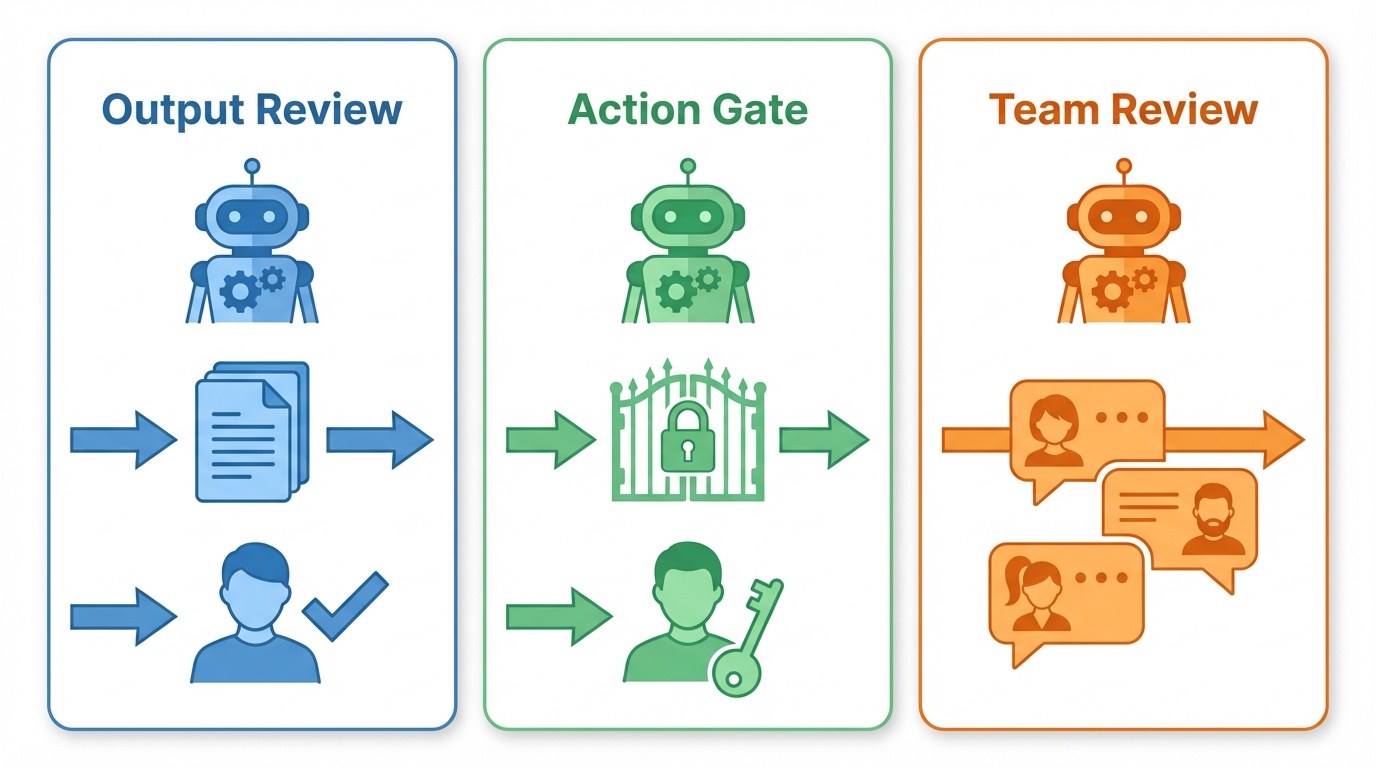
Whether you use n8n, Make, Zapier, or a combination — these three patterns cover the majority of use cases. Each matches a different level of complexity and team structure.
1. Output Review Before Sending
The simplest and most common pattern. The AI produces an output, a human reviews it, and clicks approve or reject before it goes anywhere.
Best for: Customer-facing content — email replies, social media posts, proposals, and any message leaving your organization.
The problem it solves: Your AI-drafted customer support reply is 95% good, but that 5% might promise something you can’t deliver, use the wrong tone, or misunderstand the customer’s actual issue.
How to build it:
- Trigger: Incoming email, form submission, or support ticket
- AI step: Draft a response using your LLM with a system prompt that includes your company’s tone guidelines, product details, and response templates
- Human review: Send the draft to a reviewer via Slack, email, or an in-app notification with Approve/Reject buttons
- Branch: If approved, send the response. If rejected, flag for manual handling or route back for revision
In n8n: Use the Chat node with “Send and Wait for Response” operation, or route approvals to Slack/Email with built-in Approve/Reject buttons. n8n also supports approval timeouts — if nobody reviews within 4 hours, the workflow can escalate automatically.
In Make: Use a Slack or Email module to send the draft, then a Webhook module to wait for the reviewer’s response. Make’s AI Agents (launched February 2026) can also request human input mid-execution.
In Zapier: Use a “Send Channel Message” Slack action with buttons, combined with a “Webhooks by Zapier” trigger to catch the response. On business plans, Zapier also offers a built-in “Approval” step that pauses workflows until a reviewer responds.
Key Takeaway: Start here. If you only implement one HITL pattern, make it this one. Every customer-facing AI output should get a human sanity check before it leaves your system.
2. Action Approval Gates
Instead of reviewing what the AI wrote, you review what the AI wants to do. Before the AI executes a high-stakes action — updating a database, sending a contract, processing a payment — a human approves or blocks the action.
Best for: AI agents with tool access — CRM updates, financial transactions, account modifications, and any irreversible action.
The problem it solves: Your AI agent correctly identifies that a customer needs a refund, but it’s about to process a $5,000 refund instead of $50 because it misread the ticket. An approval gate catches this before the money moves.
How to build it:
- AI agent decides on an action: “I want to call the Send Contract tool with these parameters”
- Approval gate: The workflow pauses and sends the proposed action (including all parameters) to a reviewer
- Review: The reviewer sees exactly what the AI intends to do — which tool, which data, which target
- Execute or block: Approved actions proceed. Rejected actions get logged and flagged
In n8n: n8n has native HITL for Tool Calls — click ”+” on the connector between an AI Agent and any tool, select “Add human review step,” and pick your review channel (Slack, Gmail, Teams, or n8n Chat). The agent literally cannot call that tool without human approval.
In Make: Add a Router module before high-risk actions. One path goes to an approval flow (Slack message + Webhook wait), the other is blocked until approval comes back. With Make’s new AI Agents, you can configure which tools require approval and which run autonomously.
In Zapier: Use Zapier’s “Approval” step (available in business plans) or build a manual approval with a Slack message + webhook pattern. Place the approval step immediately before any action that modifies external systems.
Pro tip: Not every tool needs a gate. Let low-risk tools (web search, data lookups, internal logging) run freely. Gate only the high-risk ones (sending emails, modifying records, processing payments). This keeps automation fast where it’s safe and protected where it matters.
3. Multi-Channel Team Review
For workflows where multiple people or teams need to weigh in, or where the reviewer isn’t sitting in a chat window. Approvals route to whatever channel your team actually uses — Slack for quick ops decisions, email for formal sign-offs, Teams for cross-functional reviews.
Best for: Team-based processes — content publishing pipelines, contract reviews, compliance sign-offs, and multi-stakeholder decisions.
The problem it solves: Your content pipeline needs the marketing lead to approve the copy, the legal team to check compliance, and the brand manager to sign off on tone — and they all work in different tools.
How to build it:
- AI processes the work: Content generation, document analysis, data classification — whatever the workflow does
- Route to the right reviewer: Use conditional logic to send the approval request to the right channel based on content type, risk level, or department
- Set timeouts: Every approval step needs a deadline. 2-4 hours for operational decisions, 24 hours for strategic ones
- Handle three outcomes: Approved (proceed), Rejected (revise or flag), Timed out (escalate to backup reviewer)
In n8n: Slack, Gmail, and Microsoft Teams nodes all support “send message and wait for response” with built-in Approve/Reject buttons and configurable timeouts. Use a Switch node to route based on content type or risk level.
In Make: Build parallel approval paths with Router modules. Each path uses the appropriate platform module (Slack, Gmail, Teams) with a Webhook to catch responses. Use Make’s scheduling features to handle timeout escalation.
In Zapier: Combine Zapier’s built-in Approval steps with Paths to route different content types to different reviewers. Use Delay steps for timeout handling and Formatter steps to package context for reviewers.
Pro tip: For high-volume workflows, batch review requests into a single digest instead of sending 50 individual Slack messages. Aggregate pending approvals into one message with approve/reject buttons for each item.
When to Add Human Oversight (and When Not To)
Every approval step adds latency and requires someone’s attention. The goal isn’t maximum oversight — it’s appropriate oversight.
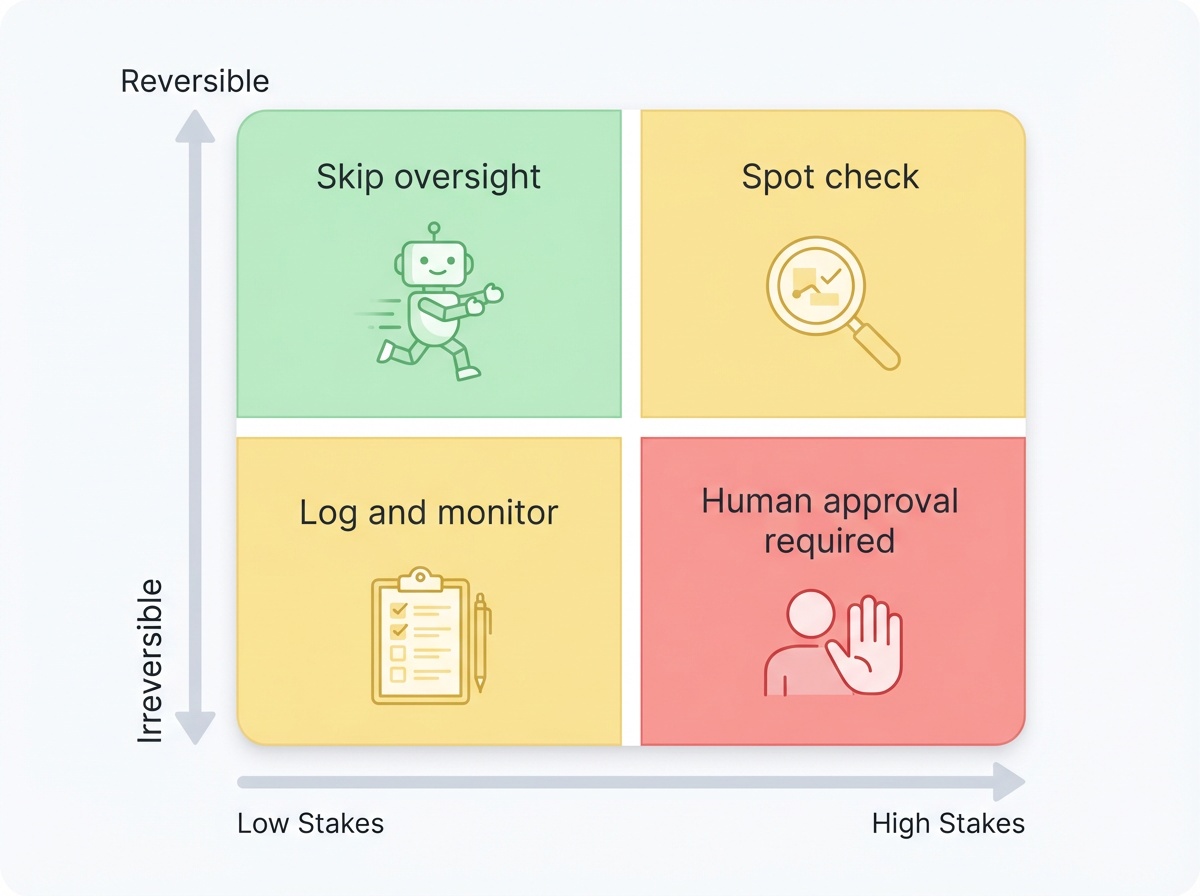
Add oversight when:
- The output reaches people outside your organization (customers, partners, vendors)
- The action modifies production data or external systems irreversibly
- The financial impact of a mistake exceeds your comfort threshold
- Regulatory or compliance requirements mandate human review
- The AI is operating on input types it hasn’t been extensively validated on
Skip oversight when:
- The action is easily reversible (drafts saved internally, soft-delete operations)
- The output is for internal consumption only and low-stakes
- The AI has been validated extensively and error rates are within acceptable bounds
- Speed is critical and the cost of a mistake is low (auto-tagging internal documents, log classification)
The Trust Ratchet: Start Tight, Loosen Over Time
The smartest approach is to start with more oversight than you think you need. Monitor your approval rates:
- 99% approval rate? You’re over-reviewing. Move that step to autonomous with periodic spot-checks
- 90% approval rate? Good balance. The AI handles most cases well, and you’re catching the 10% that need human judgment
- Below 80%? Your prompts or model need improvement. Fix the AI before loosening oversight
This is how you build justified trust — not trust based on vibes, but trust based on data showing the AI consistently gets it right for specific task types.
5 Tips for Effective Human Oversight
1. Always Show Context, Not Just Output
A reviewer who sees the customer’s original email alongside the AI’s draft makes faster, better decisions than one who only sees the draft. Include the inputs, the AI’s reasoning (if available), and any confidence scores.
2. Set Timeouts on Every Approval Step
Workflows that wait forever are workflows that fail silently. Set a reasonable timeout (2-4 hours for operations, 24 hours for strategic decisions) and build an explicit escalation path — email a manager, notify a backup reviewer, or default to “don’t send.”
3. Log Every Decision
Every approval and rejection should be logged with who reviewed it, when, and what they reviewed. This is your audit trail. You’ll need it for debugging when something goes wrong and for compliance in regulated industries.
4. Match Reviewers to Decisions
Don’t route everything to the same person. Your support lead reviews AI-drafted responses. Your sales manager reviews CRM updates. Your legal team reviews contract modifications. Build routing logic that distributes reviews by expertise.
5. Test Your Failure Paths
What happens when the reviewer is on vacation? When the Slack message gets buried? When the email lands in spam? Test timeout and escalation paths before they happen in production.
Getting Started: Your First HITL Workflow
The 30-Minute Setup
Pick your single highest-risk AI workflow — the one that keeps you up at night — and add a human checkpoint:
- Identify the critical point: Where does the AI output leave your system or modify something irreversible?
- Add a review step: Route the output to Slack, email, or your preferred channel with Approve/Reject buttons
- Set a timeout: 4 hours is a good default for operational workflows
- Build the escalation: If timeout hits, notify a backup reviewer
- Log everything: Track approval rates from day one
Tool Comparison for HITL Workflows
| Feature | n8n | Make | Zapier |
|---|---|---|---|
| Native approval buttons | Yes (Chat, Slack, Email, Teams) | Via Webhooks | Yes (Approval step) |
| Tool call approval gates | Yes (built-in HITL for AI tools) | Via Router modules | Via Approval step |
| Configurable timeouts | Yes (per node) | Via scheduling | Via Delay steps |
| Multi-channel routing | Yes (Switch node) | Yes (Router module) | Yes (Paths) |
| AI agent integration | Yes (native AI Agent node) | Yes (AI Agents beta) | Yes (AI features) |
| Self-hosting option | Yes | No | No |
| Best for | Complex AI agent workflows | Visual multi-step approvals | Simple approval chains |
Frequently Asked Questions
Does human-in-the-loop slow down my automation?
It adds latency at specific checkpoints, but the tradeoff is worth it. A 10-minute review delay is nothing compared to the hours spent fixing an AI mistake that reached a customer. The key is being selective — only add oversight where the risk justifies it, and let low-risk steps run autonomously.
How do I decide which workflows need human oversight?
Ask two questions: “What’s the worst thing that happens if the AI gets this wrong?” and “Can I easily undo it?” If the answer is “bad” and “no,” add a human checkpoint. Customer-facing outputs, financial actions, and data modifications are almost always worth gating. Internal summaries and document tagging usually aren’t.
What if my reviewer doesn't respond in time?
Always build timeout handling. Options include escalating to a backup reviewer, defaulting to “don’t send” (safer for customer-facing workflows), or auto-approving with a logged flag for later audit (only for low-risk items). Never let a workflow wait indefinitely.
Can I use human-in-the-loop with AI agents, not just simple automations?
Yes — this is where HITL is most valuable. AI agents that can call tools (send emails, update databases, process payments) should have approval gates on high-risk tools. n8n has native support for this with HITL for Tool Calls. In Make and Zapier, you can build equivalent gates with approval steps before action modules.
How much human oversight is too much?
Track your approval rates. If reviewers approve 99%+ of outputs for a specific workflow, you’re over-reviewing and should consider moving to autonomous with periodic spot-checks. The “30% rule” suggests humans should retain about 30% oversight while AI handles 70% of the work — but the exact split depends on your risk tolerance and the specific workflow.
The Bottom Line
- Human-in-the-loop isn’t about babysitting AI — it’s about building checkpoints at the moments that matter, then letting automation handle everything else
- Start with your highest-risk workflow and one simple approval pattern, then expand based on what you learn
- Trust is earned through data — track approval rates, loosen oversight gradually, and let the evidence guide your decisions
The teams getting AI automation right in 2026 aren’t the ones running everything on autopilot. They’re the ones who designed their workflows so humans stay in control of the decisions that matter — and AI handles the rest at machine speed.
Want to learn how to build these workflows step by step? Subscribe to Learn Automation →