
How to Automate Your Beehiiv Newsletter with Zapier, Make, and n8n (2026)
Beehiiv has become one of the most popular newsletter platforms for creators and businesses — but most users only scratch the surface of what’s possible with automation. Beehiiv’s built-in automations handle the basics. To unlock the real power, you need to connect it to external tools like Zapier, Make, and n8n.
This guide covers 6 practical workflows you can build today — from beginner-friendly 5-minute setups to intermediate AI-powered pipelines. Each one saves real time and works with Beehiiv’s Zapier integration, Make modules, or the Beehiiv API directly.
If you already know what Beehiiv can do natively, skip to the workflows.
What Beehiiv Can Do Natively
Before reaching for external tools, it’s worth knowing what Beehiiv handles out of the box:
- Welcome sequences — Automated email series triggered when someone subscribes
- Re-engagement campaigns — Target inactive subscribers automatically
- Survey branching — Send different follow-ups based on survey responses
- Custom field updates — Automatically tag and segment based on behavior
- Add by API trigger — Enroll subscribers into automations via API calls
These native automations are solid for basic email journeys. But they can’t talk to your CRM, post to social media, generate AI content, or pull data from external sources. That’s where Zapier, Make, and n8n come in.
6 Beehiiv Automations You Can Build Today
1. Get a Notification for Every New Subscriber
The problem: You’re posting on social media, running ads, or launching a lead magnet — but you have no real-time feedback on whether it’s actually driving signups. You only check Beehiiv stats once a day (if that).
The solution: Get an instant notification in Slack or Discord every time someone subscribes, with their email and where they came from.
Tools: Zapier (free tier works) | Difficulty: Beginner | Build time: 5 min | Saves: Real-time growth visibility
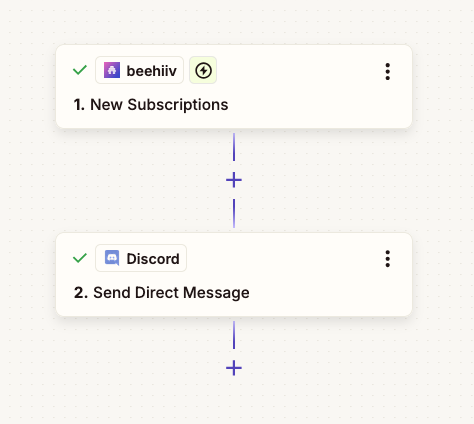
Steps:
- Create a new Zap with trigger: Beehiiv → New Subscription
- Add action: Discord → Send Direct Message (or Slack → Send Channel Message)
- Format the message:
New subscriber: {Email} | Source: {UTM Source} | Channel: {UTM Channel} - Turn on and test — you’ll get a ping within seconds of a new signup
This is especially powerful during launches. Post a tweet, watch the pings roll in, and know immediately what’s working.
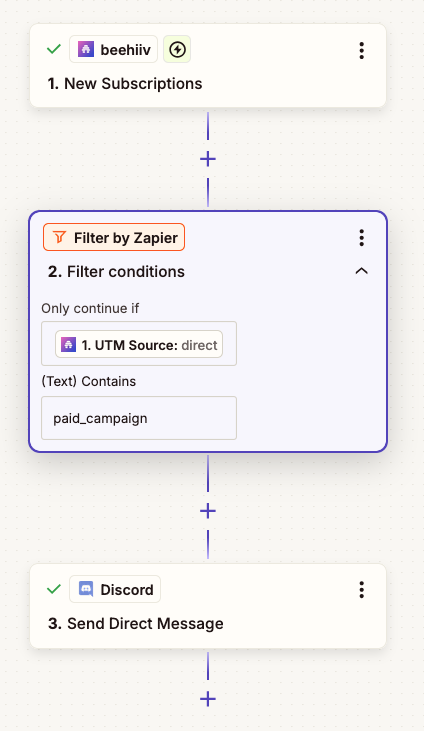
Take it further: Add a Zapier Filter between the trigger and the notification to only ping you for specific sources — for example, only subscribers where UTM Source contains paid_campaign:
2. Sync Beehiiv Subscribers to Your CRM
The problem: New subscribers exist only in Beehiiv. Your sales team uses HubSpot (or Notion, or Airtable), and they have no visibility into who’s reading your newsletter.
The solution: Every new Beehiiv subscriber automatically gets added to your CRM with all their details.
Tools: Zapier or Make | Difficulty: Beginner | Build time: 10 min | Saves: ~2 hrs/week
Steps:
- Create a Zap with trigger: Beehiiv → New Subscription
- Add action: HubSpot → Create Contact (or Notion → Create Database Item, or Google Sheets → Add Row)
- Map the fields: email, subscription date, status, any custom fields from Beehiiv
- Add an optional Filter step to only sync paid subscribers or subscribers with specific tags
- Turn on and test with a new subscription
Take it further: Add a reverse sync — when a contact’s status changes in your CRM, update their Beehiiv custom fields via Zapier’s Beehiiv integration.
3. AI-Powered Newsletter Draft from RSS Feeds
The problem: Writing a weekly newsletter from scratch takes hours. You spend most of that time reading articles, summarizing trends, and formatting content.
The solution: Automatically collect articles from your favorite RSS feeds, have AI summarize and draft a newsletter, and save it as a Google Doc for review.
Tools: Make + Claude API | Difficulty: Intermediate | Build time: 25 min | Saves: ~4 hrs/week
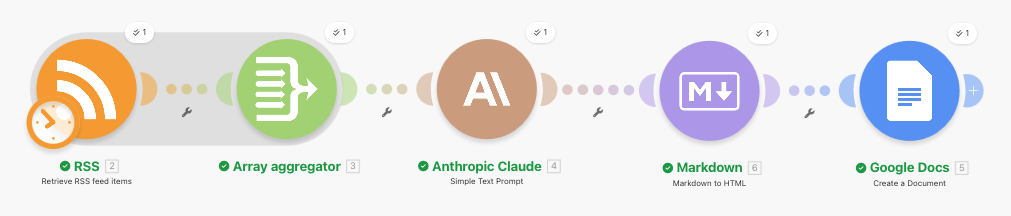
Steps:
- Create a new Make scenario with a Schedule trigger (e.g., every Monday at 8 AM). View the full scenario template →
- Add an RSS module to fetch the latest 10 articles from your industry feeds (add multiple RSS modules for multiple sources)
- Add an Array Aggregator to combine all articles into a single text block
- Add a Claude API (HTTP module) — system prompt: “You are a newsletter editor. Summarize these articles into a newsletter draft with 3 sections: top story (150 words), quick hits (3 bullet summaries), and one actionable takeaway. Write in a conversational, direct tone. Output raw markdown only — no code fences.”
- Add a Markdown to HTML module (built into Make under the Markdown app) — map Claude’s output into it. This converts markdown headings, bold, and lists into HTML tags
- Add a Google Docs → Create a Document module (not “Create from Template” — only “Create a Document” renders HTML). In the Content field, wrap the output from the previous step in a
<body>tag:<body>{{HTML from step 5}}</body>— without the<body>tag, Google Docs treats the content as plain text and shows raw HTML - Optional: Add a Slack notification to let you know the draft is ready
Take it further: Add a second Claude call to generate a subject line and preview text optimized for open rates.
4. Welcome Sequence with Conditional Branching via API
The problem: Beehiiv’s native welcome sequence sends the same emails to everyone. But a developer subscriber needs different content than a marketing manager.
The solution: Use n8n to check subscriber data and trigger different Beehiiv automations based on custom fields.
Tools: n8n + Beehiiv API | Difficulty: Intermediate | Build time: 20 min | Saves: ~2 hrs/week
Steps:
- Create an n8n workflow with a Webhook trigger — configure Beehiiv to send new subscription webhooks to this URL
- Add an IF node to check the subscriber’s custom field (e.g.,
rolefield from your signup form) - For each branch, add an HTTP Request node that calls the Beehiiv API to enroll the subscriber into the appropriate automation:
POST https://api.beehiiv.com/v2/publications/{pub_id}/automations/{automation_id}- Headers:
Authorization: Bearer {API_KEY} - Body:
{ "email": "{subscriber_email}" } - Note: Each automation in Beehiiv must have an active “Add by API” trigger enabled
- Create separate automations in Beehiiv for each segment (e.g., “Developer Welcome” and “Marketer Welcome”) — enable the “Add by API” trigger in each one
- Activate the n8n workflow and test with a new signup
Take it further: Add a Claude node to analyze the subscriber’s company website (fetched via HTTP) and auto-assign an “industry” custom field before routing.
5. Subscriber Growth Dashboard
The problem: Beehiiv’s analytics show you the current state, but you want to track growth trends over time — daily new subscribers, churn rate, and net growth in a spreadsheet you control.
The solution: A daily automated job that pulls stats from the Beehiiv API and logs them to Google Sheets.
Tools: n8n + Google Sheets | Difficulty: Beginner | Build time: 15 min | Saves: ~1.5 hrs/week
Steps:
- Create an n8n workflow with a Schedule Trigger set to run daily at 9 AM
- Add a Function node to generate yesterday’s date in
YYYY/MM/DDformat - Add an HTTP Request node to call the Beehiiv API:
GET https://api.beehiiv.com/v2/publications/{pub_id}/subscriptions?creation_date={yesterday}&direction=desc- Header:
Authorization: Bearer {your_api_key} - This returns only subscribers who signed up on that specific date
- Add a Function node to count the results (the response includes a
dataarray of subscriptions) - Add a Google Sheets node → Append Row with date, new subscriber count, and total
- Optional: Add a weekly Slack summary every Friday with the week’s stats
Take it further: Add a chart in Google Sheets that auto-updates, and share the dashboard link with your team or stakeholders.
6. Cross-Post Newsletter to Social Media
The problem: You publish a newsletter every week, but manually reformatting it for LinkedIn and Reddit takes another 30-60 minutes.
The solution: When Beehiiv publishes a new post, automatically repurpose it into platform-specific social posts.
Tools: Make + ChatGPT API | Difficulty: Intermediate | Build time: 20 min | Saves: ~3 hrs/week
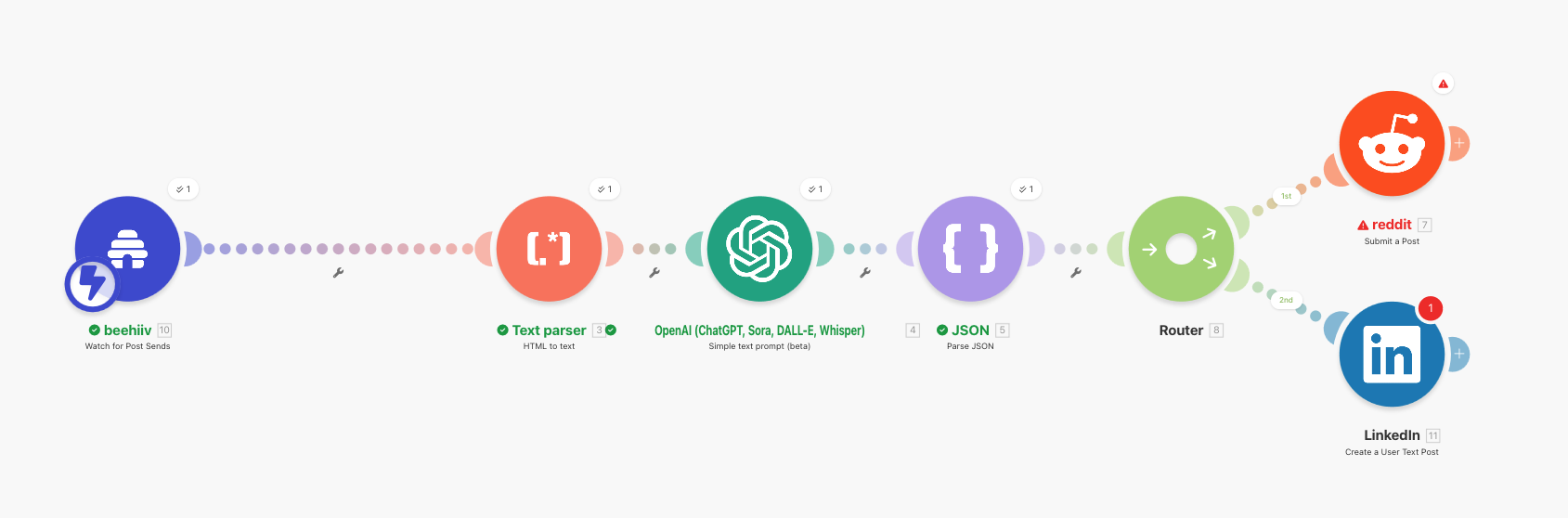
Steps:
- Create a Make scenario with a Beehiiv → Watch Posts trigger (or use Zapier → New Post Sent as a webhook into Make). This fires only when you publish a new newsletter — no duplicates. View the full scenario template →
- Add an HTML to Text module to strip the HTML from the post content
- Add a ChatGPT API module (GPT-4o-mini or GPT-5 nano) — in the Text Prompt field, write your instructions and then reference the output from the previous HTML-to-text step. The full prompt should look like: “Convert this newsletter into 2 social media posts. For each, include a title and body. (1) A LinkedIn post of 150-200 words with a hook question opening, (2) A Reddit-style informative post that’s helpful and non-promotional. Return as JSON with keys: linkedin_title, linkedin, reddit_title, reddit. Text: {output from HTML to Text step}” — click into the text field and use the variable picker to insert the HTML-to-text output at the end
- Add a JSON Parser to extract the four fields
- After the JSON Parser, add a Router module — this splits the flow into parallel branches. Add two branches (no filters needed — both should always run). In each branch, add the platform module and map its fields from the parsed JSON:
- Branch 1: LinkedIn → Create Post — map
linkedin_titleandlinkedin - Branch 2: Reddit → Submit Post — map
reddit_titleandreddit
- Branch 1: LinkedIn → Create Post — map
Take it further: Add an image generation step using a tool like fal.ai to create a unique social media graphic for each post.
Zapier vs Make vs n8n for Beehiiv
| Feature | Zapier | Make | n8n |
|---|---|---|---|
| Native Beehiiv integration | Yes (triggers + actions) | Yes (basic modules) | No (API via HTTP) |
| Available triggers | New Subscription, New Post Sent, Survey Response | New Subscriber, Post Published | Any (via webhook/API) |
| Available actions | Create Subscriber, Update Subscription, Add Tags | Create Subscriber, Update Subscriber | Any (via API) |
| AI module support | Built-in ChatGPT | HTTP + any AI API | HTTP + any AI API |
| Best for Beehiiv | Quick automations, CRM sync | Visual workflows, AI pipelines | Full API control, self-hosted |
| Free tier | 100 tasks/month | 1,000 ops/month | Unlimited (self-hosted) |
| Starting price | $19.99/mo | $9/mo | $20/mo (cloud) |
Quick recommendation:
- Zapier if you want the fastest setup and your automations are trigger → action
- Make if you need multi-step workflows with AI or data transformation
- n8n if you want full Beehiiv API access and don’t mind configuring HTTP requests
Want more automation workflows? We put together a free PDF with 10 step-by-step automations you can build with Zapier, Make, and n8n — from auto-saving email attachments to AI-powered lead enrichment.
Getting Started
Pick Your Tool
What’s your technical comfort level?
- “I want it to just work” → Start with Zapier (workflows 1, 2)
- “I can handle some complexity” → Go with Make (workflows 3, 6)
- “I want full control” → Use n8n (workflows 4, 5)
Set Up Beehiiv API Access
For n8n workflows (and some advanced Make scenarios), you’ll need a Beehiiv API key:
- Log into Beehiiv → Settings → Integrations → API
- Click Create New API Key
- Copy the key and store it securely
- In n8n or Make, use this key in the
Authorization: Bearer {key}header
Note: The Beehiiv API is available on all paid plans. Some endpoints require the Scale plan.
Frequently Asked Questions
Does Beehiiv have a native Zapier integration?
Yes. Beehiiv has an official Zapier integration with triggers (New Subscription, New Post Sent, Subscriber Downgrade, Survey Response) and actions (Create Subscriber, Update Subscription, Add Tags). You can also use Zapier’s Webhooks for more advanced use cases.
Can I use n8n with Beehiiv?
Yes, but there’s no native n8n node for Beehiiv. You connect via the Beehiiv API using n8n’s HTTP Request node. This gives you full access to all API endpoints — subscribers, posts, automations, custom fields — which is actually more powerful than the Zapier integration.
Do I need a paid Beehiiv plan for API access?
The Beehiiv API is available on paid plans (Scale and above). The Zapier and Make integrations work on all plans including free. If you’re on the free plan, stick with Zapier or Make for your automations.
What's the easiest Beehiiv automation to start with?
Start with workflow #2 — syncing new Beehiiv subscribers to Google Sheets or your CRM. It takes 10 minutes, requires no API key (Zapier handles the connection), and gives you immediate value by keeping your subscriber data in a place your whole team can access.
Can I use these automations with Beehiiv's native automations?
Absolutely. External automations complement Beehiiv’s native ones. For example, you can use Beehiiv’s built-in welcome sequence for emails while using Zapier to sync subscriber data to your CRM and n8n to track growth metrics — all triggered by the same new subscription event.
The Bottom Line
- Beehiiv’s native automations handle welcome sequences and re-engagement well
- Zapier is the fastest way to connect Beehiiv to other apps (start here if you’re new)
- Make shines for multi-step AI workflows like draft generation and social media repurposing
- n8n gives you full API control for custom dashboards, conditional routing, and self-hosted data privacy
Pick one workflow from this guide that solves a problem you have today. Build it. Once you see it running in the background saving you time, you’ll want to automate everything.
Want 10 ready-to-build automation workflows? Subscribe to Learn Automation and get the free PDF guide — step-by-step setups for Zapier, Make, n8n, and AI. One email per week, no fluff.